
NPM Security Best Practices: How to Install Packages Safely in 2026
How to Install NPM Packages Safely in 2026

The JavaScript ecosystem moves fast with help of AI. That speed is powerful, but it also creates a lot of security risks as we saw each day. Over the past few years, the npm ecosystem has experienced:
Supply chain attacks
Malicious dependency injections
Typosquatting packages
Credential theft attempts
Crypto miners hidden in dependencies
Protestware and sabotage packages
Compromised maintainer accounts
Many developers still install packages blindly using:
npm install some-packageThat approach is no longer safe. Modern front-end development requires secure dependency management practices. This guide covers practical best practices every React.js, Next.js, Angular, Vue.js, and Node.js developer should follow when installing npm packages.
Why npm Attacks Are Dangerous
A single compromised npm package can cause serious damage across your entire system and infrastructure.
Steal environment variables
Leak API keys
Inject malicious code into production
Modify CI/CD pipelines
Access developer machines
Exfiltrate SSH keys or tokens
The biggest problem is that most developers underestimate what happens during installation.
Every time you run:
npm installyou are executing third-party code directly on your machine. That includes lifecycle scripts such as:
preinstall - Runs BEFORE installation.postinstall - Runs AFTER installation.prepare - Runs before publishing and local installs.
If a package is compromised, these scripts can execute malicious commands silently in the background without you noticing.
Recent incidents show how serious npm supply chain attacks have become. In March 2026, axios versions 1.14.1 and 0.30.4 were compromised in a RAT (Remote Access Trojan) supply chain attack. Considering that axios has over 2 billion total downloads and more than 200 million monthly downloads, the potential impact was enormous.
Recent incidents show how dangerous npm supply chain attacks have become:
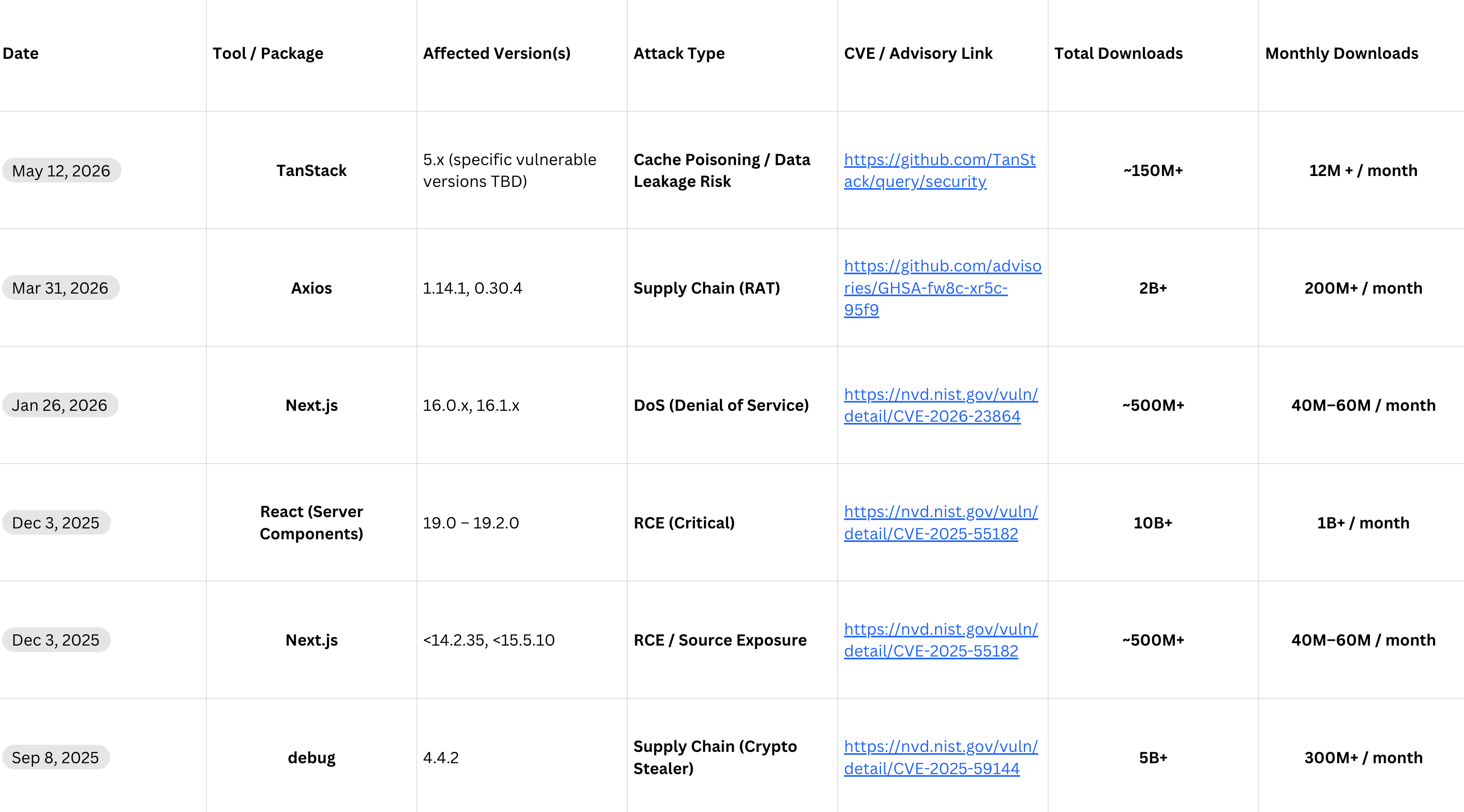
The scariest part is that most of these packages were trusted by the entire JavaScript ecosystem and used in production by thousands of companies. Developers installed them without thinking twice because they were considered “safe.”
That is exactly why npm supply chain attacks are so effective — attackers do not need to hack your infrastructure directly if they can compromise the dependencies you already trust.
Perfect .npmrc Configuration for Security in 2026
# Prevent automatic execution of install scripts
ignore-scripts=true

# Always save exact package versions
save-exact=true

# Enable npm security auditing and fail on high or critical findings
audit=true
audit-level=high

# Include sigstore provenance attestations in audit output
include-attestations=true

# Enforce strict Node.js engine validation
engine-strict=true

# Prefer cached packages when possible
prefer-offline=true

# Avoid installing packages published less than 7 days ago (value is in DAYS)
min-release-age=7

# Disable unnecessary external requests
fund=false

# Use the official npm registry or better your private npm registry
registry=https://registry.npmjs.org/

# Enable strict SSL validation
strict-ssl=true

# Reduce noisy logs in CI/CD
loglevel=error

# Prevent automatic package suggestions
update-notifier=false

# Prefer reproducible installs with modern lockfile format (v3 carries full SHA-512 integrity hashes)
package-lock=true
lockfile-version=3

# ── Dependency confusion protection ──────────────────────────────────────────
# A global registry= override does NOT protect scoped internal packages.
# Scope all internal packages and point each scope at your private registry:
#
#   @your-org:registry=https://npm.your-registry.internal/
#
# This ensures npm never resolves @your-org/* from the public registry,
# preventing an attacker from hijacking them with a higher-versioned public package.
This configuration helps reduce the risk of:
Supply chain attacks
Malicious install scripts
Compromised package releases
Unexpected dependency updates
Unsafe CI/CD installations
Dependency inconsistency across environments
In 2026, securing your npm ecosystem is no longer optional.
Every npm install is a potential attack surface.
What you should do (11 golden rules)?
1. Review Dependencies Before Installing
Before installing a package, check:
GitHub repository activity
Number of maintainers
Recent releases
Security advisories
Weekly download patterns
A package with a suspicious update history should be treated carefully.
2. Always Use npm audit
Run security audits regularly:
npm auditAutomatically fix safe vulnerabilities:
npm audit fixFor CI/CD pipelines, fail builds on critical vulnerabilities:
npm audit --audit-level=high3. Use Exact Package Versions
Avoid automatically installing unexpected updates.
Add this to your .npmrc file:
save-exact=truenow Instead of:
"axios": "^1.14.1"will be installed the exact version of the package:
"axios": "1.14.1"This reduces the risk of silently pulling compromised versions.
4. Disable Dangerous Install Scripts
One of the most effective protections is disabling lifecycle scripts during installation.
Create or update your .npmrc file:
ignore-scripts=trueThis prevents packages from automatically executing:
preinstallpostinstallprepare
scripts during installation. You can still run trusted scripts manually when needed.
5. Avoid Installing Newly Published Packages Immediately
Many malicious npm packages are discovered only hours or days after being published.
A good practice is to avoid installing package versions that are newer than a specific age.
You can configure this in your .npmrc file:
# Avoid installing packages published less than 7 days ago
min-release-age=7
This helps reduce the risk of installing:
Freshly compromised releases
Malicious typosquatting packages
Unverified updates
Supply chain attacks spreading through new versions
Waiting at least 1–2 weeks gives the community time to detect and report malicious behavior before the package reaches your production systems.
6. Prefer Offline Cache When Possible
Reduce unnecessary requests to the npm registry by preferring locally cached packages whenever possible.
prefer-offline=true
With this setting enabled, npm will use previously downloaded package versions from the local cache instead of constantly requesting fresh versions from the registry.
Benefits:
Reduces exposure to newly compromised releases
Minimizes dependency on external registries
Speeds up installations
Improves installation consistency across environments
Helps protect CI/CD pipelines from unexpected package changes
This is especially useful in enterprise environments where stable and reproducible builds are critical.
Combined with lock files and exact package versions, this creates a much safer dependency installation process.
7. Use a Custom Trusted Registry (if you have one)
Many companies avoid downloading packages directly from the public npm registry in production environments.
Instead, they use:
Internal npm mirrors
Private registries
Approved package repositories
Artifact management systems
Public npm registry:
registry=https://registry.npmjs.org/
Internal trusted registry example:
registry=https://npm.company.internal/
Large organizations commonly use tools such as:
Verdaccio
Nexus Repository
Artifactory
GitHub Packages
These registries allow companies to:
Scan packages before approval
Block malicious or vulnerable dependencies
Cache verified package versions
Prevent direct access to untrusted registries
Control exactly which packages developers can install
Improve build reproducibility
Reduce supply chain attack exposure
In secure environments, developers are often forbidden from installing packages directly from the public npm registry.
Every dependency must first pass internal security validation before becoming available to the engineering teams.
8. Use Trusted Registries and Security Scanners
Modern applications depend on hundreds or thousands of npm packages. Manually reviewing every dependency is unrealistic, which is why automated security tools are essential.
Recommended tools:
npm audit
These tools help detect:
Vulnerable dependencies
Malicious packages
Supply chain attacks
Known CVEs
Unsafe transitive dependencies
Run security audits regularly:
npm auditAutomatically fix safe vulnerabilities:
npm audit fixTools like Dependabot and Renovate can automatically create pull requests for security updates, while platforms like Socket.dev analyze package behavior such as network access, shell execution, and install scripts.
9. Always Use npm ci in CI/CD Pipelines
One of the most important missing security practices in many projects is using:
npm ciinstead of:
npm installinside CI/CD pipelines.
npm ci provides safer and reproducible builds because it:
Requires a committed
package-lock.jsonFails if
package.jsonandpackage-lock.jsonare out of syncNever modifies the lock file
Removes
node_modulesbefore installationEnforces integrity hashes from the lock file
This reduces the risk of:
Dependency drift
Unexpected package updates
Stale dependencies
Non-reproducible builds
For production CI/CD environments, npm ci should be the default installation command.
Security scanning should be part of every CI/CD pipeline and production deployment workflow.
10. Protect Against Dependency Confusion Attacks
Dependency confusion is one of the most dangerous npm attack vectors.
In this attack, an attacker publishes a public package with the same name as an internal company package but with a higher version number.
npm may accidentally install the malicious public package.
Never use unscoped internal packages
Bad practice:
internal-packageGood practice:
@company/internal-packageConfigure scoped registries
@company:registry=https://npm.company.internal/Using scoped registries ensures internal packages are never resolved from the public npm registry.
11. Use Package Provenance and Attestations
Modern npm packages can publish cryptographic provenance attestations.
These attestations help verify:
Where the package came from
Which repository produced it
Which CI pipeline built it
You can inspect package metadata:
npm view package-name distor:
npm info package-nameWhenever possible, prefer packages that publish provenance attestations.
Final Thought
Modern JavaScript applications are no longer built only with your own code. They are built on top of thousands of third-party dependencies maintained by people you may never know or verify.
A single compromised package can impact millions of developers, production systems, CI/CD pipelines, and companies within hours.
In 2026, npm security is not just a DevOps concern anymore. It is a responsibility for every front-end and back-end developer working in the JavaScript ecosystem.
Treat every dependency as executable code — because that is exactly what it is.